


Sonivo:Music Player
4.636.00 Reviews
App Specs
- Version
- 1.0.8
- Updated On
- License
- Free
- Downloads
- 10,000+
- Developer
- I Care
- Categories
- Music & Audio
- Platform
- Android
Screenshots
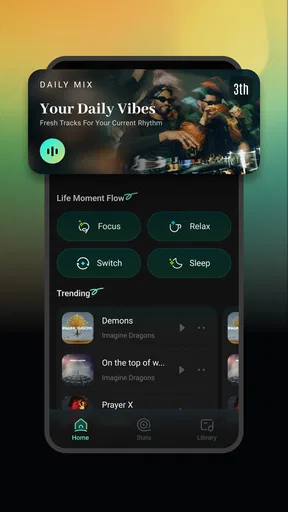
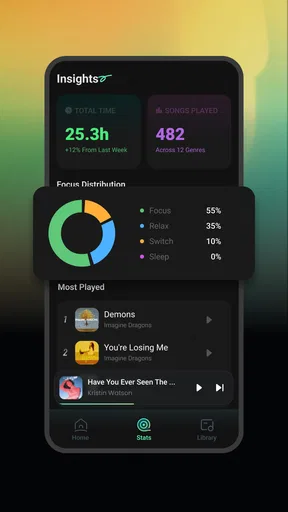
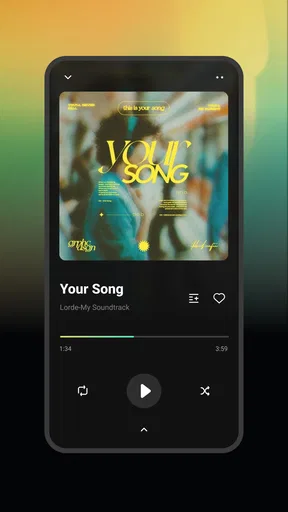
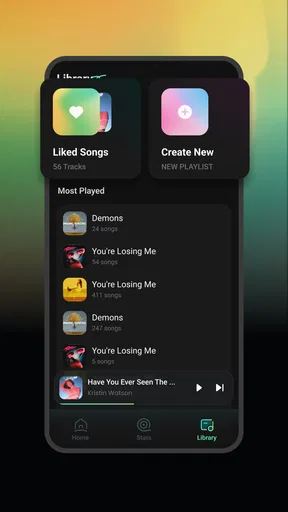
 Analysis by AppCompare
I approached Sonivo: Music Player as the kind of app you open when you want music to be simple rather than surrounded by extra services. It belongs to the Music & Audio category, comes from I Care, and its central promise is straightforward: free listening with an offline focus. That makes it interesting for people who already keep music on their device and want a direct way to play it.
My first impression is that Sonivo is easier to understand than many modern music apps. You are not being pushed toward a large online catalog, social feed, podcast network, or subscription decision. Instead, the experience is built around getting to your own listening quickly. That narrow purpose is also the key to judging it fairly: this is more useful as a personal music player than as a replacement for a streaming platform.
The app is free and suitable for Everyone, which lowers the barrier for trying it. It has reached over ten thousand installs and holds a 4.7 average from around one hundred ratings, with roughly thirty reviews. Those figures suggest that its uncomplicated approach is appealing to a small but positive audience. I would still treat the rating as an encouraging signal rather than proof that it will suit every music library or phone.
From installation to a useful first listening session
Before I judge Sonivo as a day-to-day player, I’d start with a small set of music already on my phone and see how easily I can get from opening the app to hearing a familiar track. That first check also helps me separate a simple setup snag from a genuine mismatch in expectations. Once playback is underway, the next question is whether the app’s limited, offline-first role suits the way I listen.
What to expect when you open it
The most important expectation to set is that Sonivo is an offline music app, not a service for discovering and playing an unlimited online catalog. If your goal is to search for any artist and begin streaming immediately, a conventional streaming alternative will probably feel more complete. If you already have audio files available on your device, the simpler design can be exactly what you need.
That distinction affects the whole first session. With a streaming service, the first success usually means finding a song in an online library. With Sonivo, the meaningful success is different: locate your available music, start playback, and confirm that you can listen without relying on Wi-Fi. Thinking about it this way prevents a common disappointment and makes the app’s strengths clearer.
I also like the fact that the app’s identity is not hidden behind a complicated setup story. The developer, I Care, presents it as a free and easy-to-use player, and the current release is version 1.0.8. It supports Android 8.0 and later, so people with older compatible devices can still consider it instead of assuming they need a recent phone.
Worth Reading Before You Choose

Flipboard Shows What News Apps Must Do Beyond the Feed

Switching to Android Auto Means Rethinking Your Driving Routine

Google Calendar Makes a Crowded Week Easier to Manage

Ludo King Makes the Most of the Minutes Between Plans

Baby Panda World Brings Quick Play to Modern Phones, but Its Game Library Feels Busy

ESPN’s Live Game View Makes Following Close Games Easier
There is a practical trade-off here. A focused player can feel calmer and use fewer steps for local listening, but it cannot magically provide the editorial playlists, artist pages, synchronized online libraries, or account-based continuity that people expect from major streaming apps. I would choose Sonivo for control over a personal collection, not for a broad discovery ecosystem.
Preparing the phone before the first play
Before opening the player, I would make sure the music I want is actually stored on the device in a location the app can read. This is the step most likely to determine whether the first experience feels smooth. An offline player is only as useful as the local collection it can access, so moving a few familiar tracks onto the phone is a better test than installing the app and expecting an empty device to become a music library.
I recommend starting with a small, recognizable group rather than transferring everything at once. Put together a few songs you know well, perhaps a short commute playlist or a handful of albums. This creates a quick way to check whether the library appears as expected, whether titles are readable, and whether playback behaves normally. It also makes troubleshooting less confusing than beginning with hundreds of files.
Because the app is designed for offline listening, it is worth doing this preparation while you still have a reliable connection or access to the files you intend to use. The useful workflow is not “install and stream”; it is “prepare locally, open the player, then listen without a network.” That small change in mindset is one of the most important tips for a first-time user.
I would also keep the original files organized in a way that makes sense outside the app. If you later change phones or use another player, a tidy folder structure and clear filenames remain useful. Sonivo can be the convenient playback layer, but it should not be treated as the only place where your music organization exists.
The first successful action
For me, the first real test would be starting one familiar track and then repeating the action after disconnecting from Wi-Fi. That is more meaningful than simply seeing a song title in a list. It verifies the reason to choose this app: the music remains available when a connection is inconvenient, unavailable, or something you would rather not depend on.
A realistic example is a daily commute through areas with unreliable reception. Before leaving home, I would prepare a small selection of tracks, open Sonivo, begin playback, and then leave the network behind. The benefit is not only avoiding interruptions; it is also knowing that the listening session is based on files already on the phone rather than on a service that may change its catalog or require an active account.
Another useful scenario is travel. On a flight, in a basement, or during a long day away from dependable Wi-Fi, a local player can be more predictable than an online app. I would test the exact albums or playlists before the trip instead of assuming every file is ready. That habit turns Sonivo from a vague promise of offline music into a dependable part of a travel routine.
For a first meaningful success, I would keep the test deliberately small: choose one track, play it, pause it, resume it, and repeat the process offline. If that works comfortably, add more music. This staged approach helps separate a problem with a particular file or folder from a problem with the app itself, and it avoids wasting time rebuilding an entire collection when only one item needs attention.
Where first-time users may become confused
The word “offline” can be misunderstood. It describes how you listen, not where the music comes from. Sonivo does not turn an empty phone into a catalog of songs. You need music available locally first. Anyone expecting a search box for every popular release may think the app is missing something, when in fact it is serving a different purpose.
Another possible source of confusion is the difference between an app’s library view and the files stored on the phone. If you add music after opening the player, the app may need to refresh or revisit its library before the new material is easy to find. I would close and reopen the relevant view, or restart the app if the collection does not immediately look current, rather than repeatedly tapping the same song.
File organization can also affect how pleasant the experience feels. Poorly named tracks, incomplete artist information, or inconsistent album details can make any local player look untidy. That is not necessarily a playback failure. If the music appears in an unexpected order, I would inspect the files and folders first. Cleaning the collection before judging the interface is a fairer test.
There is a second kind of confusion that comes from comparing Sonivo with subscription apps. Streaming services usually solve storage and catalog access for you, while a local player puts more responsibility in your hands. The reward is independence from Wi-Fi for playback, but the cost is that you must manage the music yourself. Users who dislike transferring, sorting, or maintaining audio files may find that trade-off frustrating.
Small habits that make the app more useful
One non-obvious advantage of a focused offline player is that it encourages deliberate listening. Instead of opening an enormous catalog and spending ten minutes browsing, I can prepare a compact selection for a specific situation: concentration, exercise, a journey, or winding down. The preparation takes a little effort, but it reduces decision fatigue once the session begins.
I would create separate folders or collections by purpose rather than relying only on broad artist groupings. A “morning walk” group and a “long trip” group answer practical needs faster than a library organized solely by performer. This workflow is especially useful on a phone with limited storage, because it helps you keep the music you actually use instead of carrying every file you own.
A second useful habit is to test listening conditions before you need them. Start playback at home, then switch off Wi-Fi and try the same selection later. If you are preparing for travel, do this a day early. The point is not to perform a technical experiment; it is to catch missing files, confusing names, or an incomplete transfer while there is still time to fix them.
A third trade-off concerns convenience versus portability. Local files give you more control over when and where music plays, but they do not automatically follow you to another device. If you regularly move between a phone, tablet, and computer, a cloud-based service may be easier. If you mainly listen on one Android phone and value a collection that works without a network, Sonivo’s narrower design becomes more attractive.
How it compares with the usual alternatives
Compared with a major streaming service, Sonivo is less useful for discovery and more useful for ownership of the listening process. You will not choose it because you want constantly refreshed recommendations or a huge online catalog. You choose it because the music you want is already available locally and you prefer not to build every listening session around connectivity.
Compared with a more feature-heavy local music player, Sonivo’s appeal is its directness. Advanced players may offer deeper sorting, extensive customization, visual effects, equalizer controls, or broader format management. Those tools can be valuable for enthusiasts, but they can also make a simple request—play my music—feel unnecessarily busy. Sonivo is better suited to someone who wants a clean starting point and does not need a studio of controls.
There is also a practical difference from downloading music inside a streaming app for offline use. Streaming downloads are usually tied to the service, its account, and its rules. A local player works from music stored on the phone, which can be more transparent and flexible. The downside is that you must handle the files yourself and cannot expect the same automatic catalog management.
I would skip Sonivo if your listening depends mainly on new releases, curated radio, podcasts, lyrics services, or seamless device synchronization. In those cases, an established online platform is likely the better match. I would recommend giving it a serious try if your priority is a free music player for personal files, especially when Wi-Fi is unreliable or you want a straightforward listening routine.
What to do after the first successful session
Once one small selection works offline, the next step is to build a repeatable library rather than importing everything without a plan. Add music in groups, check that each group is easy to identify, and remove duplicates or files you never play. This makes the app feel faster to use even if the underlying collection becomes larger.
I would also use the first week to notice where Sonivo fits naturally into your day. Perhaps it becomes the player for commuting, a backup for travel, or the simplest way to hear albums you already own. That real-world test matters more than a quick glance at the interface. An app can look appealing in the store and still fail to become part of a routine; Sonivo earns its place when offline playback solves a recurring problem.
Keep expectations realistic as you expand your use. The app’s free price and Everyone age rating make it approachable, while its support for Android 8.0 and later broadens the range of devices that can run it. Still, those details do not remove the central responsibility of maintaining your local music. The smoother your files are organized, the more rewarding the player will feel.
My overall view is positive but specific. Sonivo is not trying to be an all-purpose entertainment platform, and I would not judge it by that standard. Its value lies in making personal, offline music easier to reach without charging for the player itself. The current version, 1.0.8, is worth considering for listeners who want a focused Android option and are comfortable bringing their own music.
My recommendation is simple: install it if your first goal is reliable local listening, prepare a small group of familiar tracks, and test that group without Wi-Fi. If that workflow matches the way you already keep music, Sonivo can be pleasantly uncomplicated. If you want discovery, online access, or a complete music ecosystem, choose a streaming alternative instead. That clear boundary is not a weakness to hide; it is the key to knowing whether this particular player belongs on your phone.
Pros
- Supports offline playback for music stored directly on your device.
- Simple interface makes browsing albums
- artists
- and playlists straightforward.
- Useful playback controls
- including shuffle
- repeat
- and queue management.
- Can help organize local tracks without requiring a music streaming subscription.
- Generally lightweight
- making it suitable for phones with limited storage or resources.
Cons
- Features may vary by device and Android version
- affecting overall compatibility.
- Does not provide the licensed catalog or discovery tools of major streaming services.
- Local music playback requires properly tagged files for the best library organization.
- Some advanced audio options may be limited compared with specialist music players.
- The app’s usefulness depends heavily on having music files already saved on your device.
FAQs for Sonivo:Music Player
What is Sonivo: Music Player, and what can it do?
Sonivo: Music Player is designed for listening to music stored on your device, offering a convenient way to organize and play local audio files. Depending on the version and device, it may support common formats, playlists, queue management, repeat and shuffle modes, background playback, and basic playback controls. It is mainly intended for offline listening rather than streaming music from online services.
Does Sonivo: Music Player require an internet connection?
An internet connection is generally not required to play songs that are already saved on your phone. This makes Sonivo useful for offline listening, such as during travel or in areas with poor coverage. However, internet access may still be requested for advertisements, app updates, optional online features, analytics, or other services included by the developer. Your experience can therefore vary depending on the app version.
Which audio files are compatible with Sonivo: Music Player?
Compatibility depends on the audio formats supported by your Android or iOS device and the specific version of Sonivo. Common files such as MP3, AAC, M4A, WAV, and similar formats are typically the safest choices, while unusual, protected, or damaged files may not appear or play correctly. If a song is missing, check its storage location, file permissions, and whether the format is supported.
Can Sonivo: Music Player play music in the background and when the screen is locked?
Sonivo is intended to function as a practical music player, so background playback and lock-screen controls may be available on compatible devices. Nevertheless, behavior can be affected by battery-saving settings, notification permissions, operating-system restrictions, Bluetooth accessories, or manufacturer-specific background limits. If playback stops after locking the screen, allow the app to run in the background and disable aggressive battery optimization for it.
Is Sonivo: Music Player free, and are there advertisements or in-app purchases?
The availability of free features, advertisements, premium upgrades, or in-app purchases can differ by platform, region, and app version. Before downloading, review the official store listing for current pricing and subscription details. Also check the permissions and privacy information, especially if the app displays ads or requests access to your media library, because those requirements may affect your overall experience.


